Package fi.bitwards.service
Bitwards SDK for Android
This page describes the prerequisites and steps to set up an Android Studio project to use Bitwards SDK. Once the project is set up, refer to the BitwardsService class documentation for SDK API usage. For general information, visit bitwards.fi.
Contents
Platform Overview
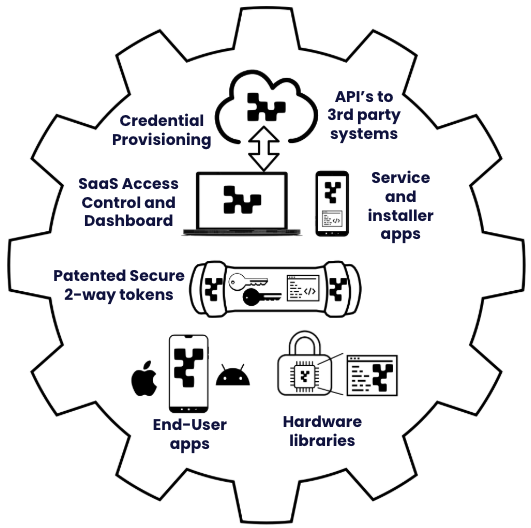
The Bitwards Access Platform is an end-to-end secured token-based mobile credential solution designed for stand-alone locks and hardware access control systems. It allows sharing mobile credentials to end-users to gain access to doors, cabinets, or other assets using a mobile phone, and provides tools for controlling access rights to desired resources.
The platform consists of a secure mobile credential provisioning service, access control software, administration and service applications, end-user applications, libraries for integrating various hardware and locks with the platform, and a highly secure token-based protocol enabling full off-line and stand-alone operation.
Introduction
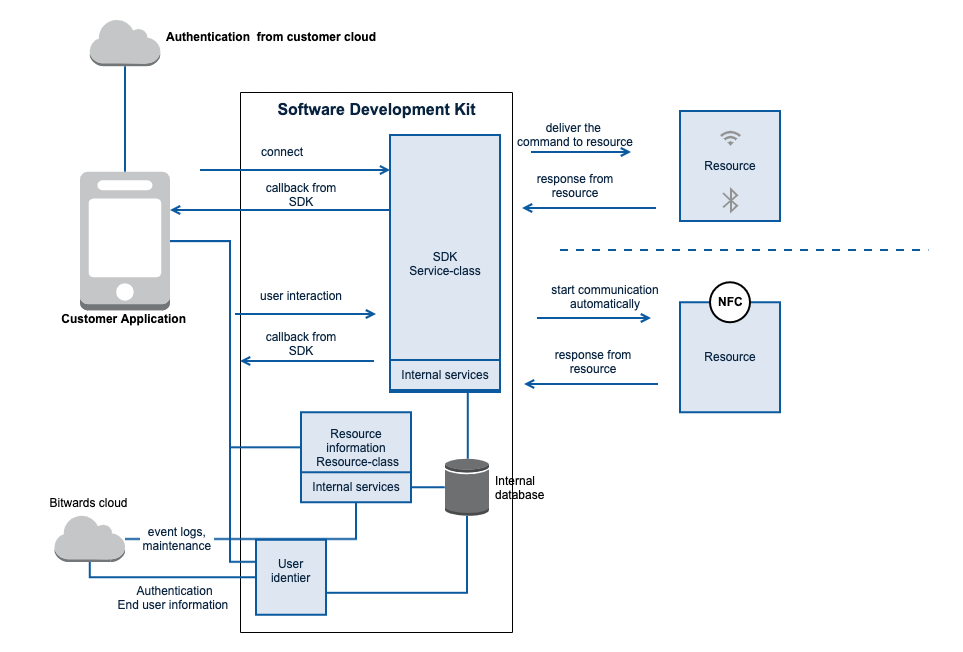
Bitwards SDK provides an easy to use API to interact with Bitwards resources. Bitwards SDK is intended to be used by 3rd parties who want to integrate Bitwards technologies into their application. The SDK provides the needed functionalities to:
- connect and authenticate to the server,
- synchronize the local resource database with the server,
- scan for Bluetooth Low Energy (BLE) based resources that are nearby, and
- access BLE and NFC based resources.
Migration Guide
This section lists special considerations that a developer must address when upgrading to a newer version of the Android Bitwards SDK.
Upgrading to 3.6.5 or newer:
- Minimum supported Android SDK is now 23 (Android 6), previously it was 21 (Android 5). So, please change minSdkVersion in your app module's build.gradle to 23 or higher.
Upgrading to 3.6.1 or newer:
- The ACCESS_FINE_LOCATION permission is no longer required. If it is not used, the mandatory BLUETOOTH_SCAN permission must state that this permission is never used to acquire location of the device in the application. This is done by adding the statement: android:usesPermissionFlags="neverForLocation" to the BLUETOOTH_SCAN permission declaration in application's manifest file.
Upgrading to 3.5.0 or newer:
- compileSdkVersion and targetSdkVersion are required to be 34 or higher.
- If resource opening with NFC is required to be supported when application is not running or when it is in the background, the FOREGROUND_SERVICE_CONNECTED_DEVICE permission needs to be declared. This also means that a video demonstrating the resource opening over NFC while application is not running or it is in the background needs to be posted to Google Play's Developer console for review. This is not required.
Upgrading to 2.7.8 or newer: Starting from version 2.7.8 the following method signatures changed to accommodate larger Account ID and Location ID values:
- BitwardsAdminInfo.getAccountId() now returns long rather than int
- BitwardsResource.getLocationId() now returns long rather than int
- BitwardsResource.getAccountId() now returns long rather than int
- BitwardsService.deleteUserAccount(List
accountIDs, final ResultCallback callback) has changed to BitwardsService.deleteUserAccount(List accountIDs, final ResultCallback callback)
Upgrading to 2.7.0 or newer:
- Starting from version 2.7.0 and newer versions of the Android Bitwards SDK support Android 12, i.e., Android SDK version 31 or 32. This means that the new Bluetooth permissions should be used when the application is running in Android 12 device and the targetSdkVersion is 31 or higher. Read more about using Bluetooth and permissions: [Important note about Bluetooth permissions].
- compileSdkVersion and targetSdkVersion are required to be 31 or higher.
Bitwards SDK Setup
This section describes how to set up an Android Studio project to use Bitwards SDK for Android. Android Studio can be downloaded from the Android Studio website.
Prerequisites
In order to use Bitwards SDK, the following need to be requested from Bitwards:
- Developer account (username, password) for Bitwards private Maven repository.
- Bitwards backend server URL.
- If NFC-based resources need to be supported, then a Host Card Emulation (HCE) configuration file needs to be obtained from Bitwards (BLE-based resources are supported by default). Additionally, FOREGROUND_SERVICE_CONNECTED_DEVICE needs to be declared if NFC-based resources need to be opened while the application is not in the foreground (i.e., application is not running or is in the background). (Note that this also means that a video demonstrating the opening while application is not running beforehand needs to be uploaded to Google Play Developer Console.)
- SDK license from Bitwards (this is not currently needed).
Setup Project
This section describes the steps to set up an Android Studio project to use Bitwards SDK.
Add Bitwards private Maven repository to your project level build.gradle file:
 buildscript {
     repositories {
         ...
         maven {
             url 'https://developer.bitwards.io/repo'
             credentials {
                 username bitwardsMavenUsername
                 password bitwardsMavenPassword
             }
         }
     }
     ...
 }

 allprojects {
     repositories {
         ...
         maven {
             url 'https://developer.bitwards.io/repo'
             credentials {
                 username bitwardsMavenUsername
                 password bitwardsMavenPassword
             }
         }
     }
     ...
 }
Username and password are needed to access Bitwards private Maven repository; specify them in your global gradle.properties file. The global gradle.properties file is typically in the .gradle directory in your home directory.
 bitwardsMavenUsername=<username>
 bitwardsMavenPassword=<password>
Add dependency to Bitwards SDK to build.gradle of the module that uses the Bitwards SDK, where the X.Y.Z is the version of the SDK.
implementation 'fi.bitwards:bitwards-sdk:X.Y.Z'In addition, the following should be considered:
- minSdkVersion must be 23 or higher.
- compileSdkVersion must be 34 or higher.
- targetSdkVersion must be 34 or higher.
Important note about notification IDs reserved by the Bitwards SDK:
- If Bitwards SDK's own error reporting is used, Notification ID 0xC8A5 (51365 decimal) is reserved by the Bitwards SDK for crash report notifications. Host applications must not use this notification ID, as doing so will cause silent notification collisions where either the crash notification or the host app notification is unexpectedly dismissed.
Set android:allowBackup to false in the application element of the AndroidManifest.xml.
Important note about Bluetooth and required permissions:
- When using Android SDK version 30 or lower, i.e., the application is running in a device with Android 11 or older, the application must have ACCESS_FINE_LOCATION permission and the permission must be requested from the end user during runtime. To setup the application with location permissions, please refer to Request location permissions documentation for details.
- When using Android SDK version 31 or higher, i.e., the application is running in a device with Android 12 or newer, the application must have BLUETOOTH_SCAN and BLUETOOTH_CONNECT permissions, and these permissions must be requested from the end user during runtime. If your app will not use ACCESS_FINE_LOCATION permission, then you must add android:usesPermissionFlags="neverForLocation" to the BLUETOOTH_SCAN permission. Otherwise, scanning will not work. To setup the application with Bluetooth permissions, please refer to Bluetooth permissions documentation for details.
The above cases must be handled appropriately in the application in order to make sure that Bitwards SDK's Bluetooth functionality works properly. Especially, when the application is being updated from a version that was not using targetSdkVersion 31 or higher, or when the operating system in the device upgraded to Android 12. For more information about Bluetooth related permissions, please visit Bluetooth permission page at Android Developer website: [Bluetooth permissions].
Note: Bitwards SDK no longer requires device lock to be enabled.
Configure project
Configure Bitwards SDK related parameters.
Add the following parameters to build.gradle of the module that is using Bitwards SDK:
- bitwardsEnvironmentUrl: URL to the Bitwards backend server (mandatory)
- bitwardsOauth2Url: URL to the OAuth2 endpoint for the Bitwards backend server (optional)
Adding a single configuration parameter is always a double operation. First, the value itself must be named and specified in the build.gradle file, and second, the value needs to be mapped to meta-data in AndroidManifest.xml.
Below is a simple example of how to add a configuration parameter in the module's build.gradle file: android {
...
defaultConfig {
...
manifestPlaceholders.bitwardsEnvironmentUrl = "<SERVER_URL>"
}
...
} <manifest ...>
...
<application ...>
...
<meta-data
android:name="bitwards.environment.url"
android:value="${bitwardsEnvironmentUrl}" />
</application>
</manifest> android {
...
buildTypes {
debug {
...
manifestPlaceholders.bitwardsEnvironmentUrl = "<SERVER_URL>"
manifestPlaceholders.bitwardsOauth2Url = "<OAUTH2_URL>"
}
release {
...
manifestPlaceholders.bitwardsEnvironmentUrl = "<SERVER_URL>"
manifestPlaceholders.bitwardsOauth2Url = "<OAUTH2_URL>"
}
}
...
} <manifest ...>
...
<application ...>
...
<meta-data
android:name="bitwards.environment.url"
android:value="${bitwardsEnvironmentUrl}" />
<meta-data
android:name="bitwards.oauth2.url"
android:value="${bitwardsOauth2Url}" />
</application>
</manifest>After all the above steps have been completed, the project is ready to use Bitwards SDK. Please continue with the BitwardsService class documentation to see how to use Bitwards SDK.
Support
In case you have any questions or encounter an issue, please contact Bitwards support to receive technical assistance with the Bitwards Mobile Application SDK or the service: support@bitwards.fi
-
ClassDescriptionBitwards end user entity.BitwardsAdminService provides utility functions for accessing dedicated admin services in the Bitwards backend server.The BitwardsAdminCallback which is used to return then result when asynchronous method is used.The CompanyNfcUrl instance, which contains the name, and base URLs for that company.BitwardsConfig class is used to convey default settings to BitwardsService.Builder class is used to build BitwardsConfig instance.Class for holding end user's credential to connect to BitwardsService.Builder class to build Credential instance.Bitwards service exception.Bitwards resource entity.An access entry of the resource (resource event).This class describes hardware features of the resource.Validity period when resource is accessible.Represents the schedule when the end user has access to a particular resource.Represents an exception day with alternative access times, which overrule regular rules.Represent a single rule specifying access times on weekday basis.div.important { border-left: 2px solid #000000; margin-left: 15px; padding-left: 15px; margin-top: 15px; margin-bottom: 15px; font-size: 90%; }AuthenticationTokenExpiredCallback is used to notify UI that authentication token has expired.Background BLE scan callback for reporting found/lost resources.Callback to deliver Installation request list or error of the operation.Deprecated.BitwardsResourceListUpdatedCallback is used to notify UI that BitwardsResource list has been updated from the server.Callback to deliver Bitwards resource type list or error of the operation.Callback to deliver Bitwards end user's profile data or error of the operation.Resource callback notifications when connecting and communicating with a resource using BLE.BLEResourceConnectionStateCallback can be used instead of basic BLEResourceCallback interface.Resource callback notifications when the application also wants a callback when the resource maintenance phase during the communication has been completed.BluetoothProximityAccess class is used to handle Bluetooth proximity access functionality.This inner class is used configure Bitwards SDK further.BitwardsService.Debug class is used to setup error reporting.LoginCallback can be used instead of ResultCallback when using
BitwardsService.login(BitwardsCredential, ResultCallback)method.Resource callback notifications when connecting and communicating with a resource using NFC.Callback to notify success or error of an operation.Select resource callback is used when more than one known resources were found.Bitwards end user entity.